Reading Voice vs Thinking Voice

Reading Voice vs Thinking Voice anchor chart
Reading Voice and Thinking Voice Anchor Chart (note: sometimes we misspell things and our students find it hilarious. Seriously. These kids have pointed it out to every adult who walks into the room. Of course, now I’m putting it on the internet.)

I’ve been working a lot with my 6th graders on close reading for the past few months. We’ve been previewing, reading, annotating, rereading, synthesizing. Or, at least trying. Some of my students took to the approach right away, surprising me with how much they really got that we reread to understand more deeply and annotate to document our thinking or point out specific ideas. But others just thought it was a waste of their time. For these kids, reading wasn’t necessarily about making meaning, it was about getting things done.

Getting to the end.

Getting the questions answered.

Getting on to the next thing.

Getting it all done, so I can do something better.

This is a mindset that reading teachers struggle to change. There are definitely things that help–increasing independent reading time, helping students to choose reading material that they’ll really love, high-interest texts for instruction, authentic tasks–but when you’ve tried all of those and your students who just run a little too fast and are speeding their way through things, having a discussion about reading voice vs thinking voice can be very helpful.

I first encountered the idea of explicitly teaching about reading voice vs thinking voice, was when I read Cris Tovani’s book I Read It But I Don’t Get It very early in my career (probably my first year). This book is an amazing resource for anyone who teaches striving readings in middle or high school. In grad school, we always talked about self-monitoring and using fix-up strategies as one of the keys to strong reading comprehension, but the tools  I left with were pretty limited (I am a bit worried this is still the case now that I’m teaching the class, but I’m working on it!). Really, I had one. It was called “The Critter” and it came from one of the course texts from my first semester practicum. It involved drawing an odd looking creature that the students would use to personify their thinking voices. I’m sure you can imagine how this strategy goes over with most middle schoolers. I’ve used and modified Cris Tovani’s lesson over and over again and I’ve had a lot of success with it.

The biggest thing that hooks kids is that I talk about a strategy that I really do use in real life. I can explain, quite vividly, how it works for me. When I’m reading I know that I’m not paying attention if the only thing I hear is my Reading Voice–the words going by in my head with no questions or connections popping up, I’m not engaged in reading and I’m not comprehending. But, if I’m making too many connections… You know how that goes: one connection leads to another and soon I’m thinking about what I’m going to eat for dinner later, or that one time I went to the beach in North Carolina…I’m not reading at all anymore. Well, my eyes are moving along the page, but the only voice I hear is my thinking voice. But, when my reading voice and thinking voice work together, that’s when you’re a reader who is actively engaged in comprehending a text.

After discussing and modeling, I ask students to add post-its to the anchor chart with examples of their reading voices and thinking voices to the anchor chart using post-its. I prompt them to add more information after they’ve done a few sessions of independent reading. It’s amazing what they begin to notice. I’m hoping we can keep revisiting this strategy, especially for my students who would really rather that reading was over with as soon as possible.

How do you teach self-monitoring and other metacognitive skills when you teach reading?

Getting Started with Digital Portfolios

Front page of one of our digital portfolios
The front page of one student’s digital portfolio.

This year I’m piloting digital portfolios with my M2 (grade 6) class. I noticed last year that there wasn’t a lot of communication between the Learning Support program and parents. There aren’t really grades, and there’s the occasional email, but more often than not, no work goes home. Most of the work that parents do see are the results scaffolding and specialized graphic organizers, and other supplements and complements to classroom instruction. Last year, in my first year in the position, with the help of my principal we added more transparency by creating learning plans for students that contained goals for the skills that would be addressed during the school year (I know, for those of you in public schools this is SOP, but it something that seems to be slowly becoming a part of international schools). I thought this was great, but I wanted to do more. Then I got connected to Matt Renwick through Twitter and his blog, and started reading his book Digital Student Portfolios. I decided to create digital portfolios that were primarily designed to show growth, but that could be used to showcase certain pieces of work or activities that students were particularly proud of. I wanted to use digital portfolios as an opportunity to create a dialogue with students and parents about growth, and to continue to build a culture of self-reflection for learning in my classroom.

The first challenge I faced was finding the right platform to use to create the digital portfolios. My school has a pretty strict “no use of 13 and over programs and apps by students under 13” policy, so Evernote, the platform Matt discusses in his book, was out. The school’s Tech Integrator and I discussed  Google Sites, Blogger (both part of our school’s Google Apps for Education subscription) or Weebly. I ended up dismissing Blogger because I wouldn’t be able to house several blogs on the same page, and I knew that teaching students how to effectively use tags would take a while. After making two sample portfolios, one in Weebly and one in Google Sites, I decided that Weebly would work best for my purposes and be easiest for the students to use.  So far, I would recommend this as a platform.

Benefits

  • Weebly is really easy to use. It’s uses a drag and drop system to add pictures, buttons, URLs, and HTML code. I even taught my students how to embed Google Docs in their Weebly blogs (something I had thought would be easier with Google Sites).
  • Not having the easy-embed function from Google Sites led to a mini-lesson on HTML, which the students seemed to enjoy.
  • The school’s educator account provides some measure of privacy and security for students. Their sites are password protected.
  • If students forget passwords, etc they are all managed by our Instructional Technology department.
  • It’s easy for students to personalize and make their own.
  • It’s easy to share with parents and for them to navigate.
  • Creating individual blogs for each goal allows us easily see progress on individual goals, and the most recent activity (that, I hope, represents the students’ current progress toward the goal) is at the top of the page.
  • The blog format allows me, their classroom teachers, their parents, and, if they choose, their peers, to comment on the work that they share and ask questions about it.

Drawbacks

  • Weebly is extremely customizable, which is a good thing. I want students to take ownership of their portfolios I had to get through a few classes of students playing around with the design of their website, which was OK, but often what they thought of as a “good design” made their message difficult to understand. I think the next time I do this, I need to spend a bit more time on the front end integrating instruction on how design can influence the audience’s ability to understand our message, maybe using specific websites (possibly even my own) as examples.
  • Although there is a way for the student and I to be co-owners of a Weebly site, the Tech Integrator and I haven’t been able to make it work yet. This is something that would have been much easier with Google Sites or with Blogger, but I think the ease of use more than makes up for this.
  • The one blog per goal set up makes it more difficult to use tags to see connections between assignments and activities that match up to multiple goals.
  • Next year, I need to do a better job reviewing the difference between personal online communication and professional online communication (particularly editing one’s work before posting it online–see the spelling error above).

Overall, I have been completely blown away by all the things that I could do with a digital portfolio that I wouldn’t have been able to do with a traditional portfolio. I had just assumed that a digital portfolio would be a substitution for a physical portfolio or it would be an augmentation, adding some functional improvement, but not significantly different from the physical version. I am, however, starting to see that digital portfolios are really modifications of traditional portfolios, allowing my students, their parents, and me to do things that weren’t possible with the original paper format. I’m excited to continue our work and I’ll keep you updated as I keep working with the students on building their portfolios.

Have you used digital portfolios? What have been your successes? Learning experiences?

Close Reading for Intervention

Close reading guided practice
Guided practice with close reading on the interactive whiteboard

I mentioned in some earlier posts that this summer I did a workshop with Pooja Patel on integrating close reading strategies with writing from sources. One of the great things about doing presentations like this is the amount of research one does beforehand (especially when one has the opportunity to just say “I want to learn more about this. I’l do a presentation). I had dabbled in close reading, the way you do in a middle school English class, but mostly in large group settings, but hadn’t really approached it in a systematic way. In order to prep for the presentation, I delved further into the book Close Reading of Informational Texts by Sunday Cummins and into the article from  Journal of Adolescent and Adult LiteracyClose Reading as an Intervention for Struggling Middle School Students by Douglas Fisher and Nancy Frey. Before reading these texts, I didn’t really see how close reading could benefit everyone. I had focused on it as a strategy for general education classes, rather than one that could have significant benefits for ELLs and students with LD. Now that I’m implementing it, my struggling readers have really taken to the strategy, and are beginning to synthesize what they read.

I started the year by slowly and intentionally introducing and then integrating the strategies that Dr. Cummins discusses in her book: accessing and applying prior knowledge of text structure and content vocabulary, setting a purpose for reading, self-monitoring for meaning, determining importance, and synthesizing. I’ve just introduced students to determining importance, and we’re working our way toward some explicit instruction in synthesis. We’re working on reading through our first short texts integrating these skills now. I thought they would be more resistant to repeated readings, but they have been enjoying reading about unusual animals and keep getting more out of the text each time they read.

Close Reading Skill: Questioning

After the quick overview of synthesis Dr. Cummins recommends, I began by teaching questioning as a way to support students’ self-monitoring skills. I decided to deviate from her sequence for a number of reasons, but most importantly, because self-monitoring was a skill that came up over and over again in my students’ IILPs (like IEPs, but for International Schools), and I noticed from my initial assessments that students experienced difficulty differentiating between explicit and implicit questions. After an introduction to QAR and a great deal of guided practice with asking, classifying and answering questions, students were beginning to use questioning to help them monitor their own comprehension. A few even transferred (!) the strategy to classes outside of learning support.

Close Reading Skill: Previewing
Using TELL to preview a text before close reading
Anchor chart for the TELL strategy (Cummins, 2013)

We used the strategy TELL (Cummins, 2013) to help students tap into their knowledge of text structure and to help set a purpose for reading. Both skills were taught explicitly in separate lessons. I’ve used previewing strategies before and have spent time with struggling students teaching text structures, but teaching it with the goal of close reading in mind opened up the strategies in ways I hadn’t considered. Students aren’t just using text features and structures as a guide to help them build schema and organize facts from the informational text, they’re actually starting to have conversations about why authors would choose specific text features or formats. For example, in a text by Nic Bishop that we read, they pointed out that it seemed like a journal because there were dates in the subheadings. As we read, they even asked a really insightful question: “Why does the author use I instead of writing it like a ‘normal book’?” After some discussion they decided that the author wanted to let us know that he had really experienced these things, and that maybe he had wanted to draw the reader in and make him or her more curious about animals.

Students are also better able to set purposes for reading after previewing, which helps them to decide what is important. They made their predication about what the text would be about individually and then we discussed the different predications and came up with one that worked for all of us (see below). Using this, we were able to set a purpose for reading as a group.

Close Reading Strategy: Determining Importance
Close reading guided practice
Our close reading guided practice hanging on the wall.

Our most recent lesson focused on determining importance. I love Dr. Cummins’ introductory lesson about separating the “pasta” words from the “water” words. It actually worked quite well with my students. Using our purpose as a jumping off point, I modeled how to pick out the important information (see above). Today, students worked on finding it independently and we shared our annotations on the interactive whiteboard and made our first try at composing a summary. Again, I found it really interesting the things that showed up in their summaries. We’ve worked on summarizing before, but this is the first time that they’ve  written in response to a text that contains more synthesis than summary. Their description of the glass frog was peppered with statements like “We wonder how it eats moths and flies if it is only the size of a bean,” and “We think it developed this adaptation to hide from predators.” Granted, this was a scaffolded, guided task, but I’m seeing changes in the way they look at texts.

Have you used close reading with your classes? What advice would you have for next steps?

Tests, Tests, Tests

Tests, Tests, Tests
Students working on their tests in the Learning Lab.

We’ve hit that point in the year when the first units are starting to wrap up and all of my students are starting to panic about tests. Most of them have no reason to panic: They know what they need to do, but they have some sort of test anxiety. Many students, however, don’t really know how to study, which increases this anxiety. They spend most of their time working on what they already know how to do and not enough working on what they don’t know. Most likely they do this because they’re just not sure how to study what they don’t know or understand.

This year I decided to try to explicitly teach these skills, starting with knowing what to study. I created a study guide for the students in my learning support class. It’s essentially a self-assessment rubric that lists the various topics on the test and allows students to sort themselves into one of three categories: Got it!Working on it!, or I need more practice. Each category is defined (see below–it’s not pretty, but it did the job). What made me really excited was that when I shared it with the general ed math teachers, they all chose to use it with their classes.

Once the student completed the form, we looked at the areas that they thought were the weakest and created plans for how they would study. My original idea was to have them actually make a plan using their studybook or a calendar with activities they would do in order to study for each of the concepts they were unsure of, but it became clear pretty quickly that my students we they not sure what to study, they also weren’t sure how to study. We had to do a lesson about how to study, and how to study for math tests in particular.

We discussed that the best way to study for math was to practice doing problems that are similar to what will be on the test and discussed places to find questions with answers (our textbook being the main source). The other important piece was making sure to refer to notes and other sources either while completing a problem (if you are having difficulty remembering the steps) or after completing a problem. Because note taking is another area we’re working on, I created these checklists to help students practice.

Practice for tests with checklists

I laminated copies of the checklist for each student so that they could use a dry-erase marker to check off the steps as they completed them. As they worked with the checklists, they became more confident in their abilities and were able to practice the steps of the process. Eventually, I’d like to get them to the point where they can make their own checklists from their notes, but before that can happen we need to work on note taking skills.

The last step in this whole process is going to be reflection. Once students have taken the test, they will be allowed to do corrections. I created this test corrections sheet and shared it with the math teachers.

I like this test corrections sheet because it asks students to think about what might have gone wrong during an assessment, whether it is careless errors or really not understanding a concept or a process. I’m hoping that this will help us with reteaching and intervention, and that maybe we can offer students another opportunity to show what they know after reteaching in the form of a retest or another assignment.

How do you teach study skills? What do you do about test corrections or retakes? What opportunities do you offer students to demonstrate mastery of a topic after the assessment is done?

Games for Learning

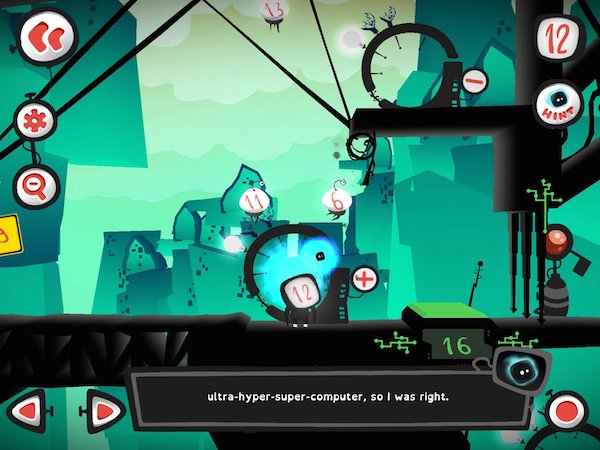
Twelve a Dozen Screenshot via Game Revolution

This is what I’ve found this year: It is easy to add games to my classroom. It’s not, however, easy to use games for learning, either to support student learning as an intervention or to extend student learning. More importantly, it’s not easy to teach students to learn from games. Or at least the students I am teaching this year.

What I’m noticing is that many of my students are used to being passive consumers of game entertainment. They are mostly casual gamers, but some of them use systems like the X-Box to play FIFA Soccer. Otherwise they play games like Angry Birds and Fruit Ninja. Not that there’s anything wrong with either of these games. They’re fun, and can involve strategy. I even know someone who does a physics project that’s entirely centered on Angry Birds. But, the tack my students have taken on these games is, as they call it, “spray and pray”. They seem to lack the patience and problem solving skills that many of my friends who play RPGs or puzzle games seem to have cultivated, and that I even noticed in my youngest sister when she started gaming in middle school (I was in grad school at this point). When playing games like Dragon Box 12+ or Twelve a Dozen, my students quickly give up and try to sneak over to play 2048 or decide to take some selfies. However, I have another group of students who become totally immersed in these games. They stop by at lunch and ask if they can borrow my iPad to play Twelve again. They discuss strategy. They’re enthralled by Dragon Box and have even started making connections between the game and algebra tasks. What’s the difference between these two groups?

I know my approach hasn’t been different with them. I introduced the games in the same way, gave the same preview, and provided similar supports when they asked questions. Perhaps it is that one group is 7th graders and one is 6th graders, but I have a second 7th grade group where a majority of the students are more like the 6th grader group–engaged and interested in solving problems. It could have something to do with learned helplessness. It could also have something to do with the students’ respective understandings of what games are, and how their particular learning styles interact with the characteristics of my chosen games, and how my students’ experiences with school frame their educational gaming experiences.

According to Jane McGonigal in her book Reality is Broken, games are defined by four characteristics: a goal, rules, a feedback system, and voluntary participation (p 26). Each of these characteristics impacts a person’s engagement with a game–whether it’s  a board game, a puzzle, an iPad app, or a complex MMORPG.

A Goal

McGonigal defines a goal in a game as the specific outcome a player wants to achieve. This goal, she says, is what gives the player a sense of purpose. In Twelve the goal to get the main character, 12, home after an explosion in the city of Dozonopolis that destroyed the super-computer. In Dragon Box it’s to help the dragon hatch–it will only come out of the box to eat when it is alone on one side of the screen. But the idea of a goal becomes more complex when we’re talking about using games for learning. For example, I have a goal for my students beyond the explicit goal of the game. I want them to sharpen skills and begin to develop answers to our essential questions: How do patterns in the world help us to make meaning and become better learners?, How can I use known information to figure out new information?, and What strategies can I use to work through a problem when I’m stuck? I chose these games specifically because, in addition to having an engaging explicit goal, the implied goals of the games (the learning goals) matched up with my goals for my students. But are the explicitly stated goals of the game enough to give my students a sense of purpose? Sometimes yes, sometimes no. But if they don’t understand the implicit goals, will they be actively engaged with the game enough to achieve the implicit goals? This is where I’m getting stuck.

Rules

I really like McGonigal’s definition of game rules: They place limitations on how one can achieve the goal of the game, forcing gamers to think creatively and apply problem solving skills. This is another point where my students start to get stuck. I posted a while ago about how being comfortable with being uncomfortable, confused, or not knowing was an important skill for students to learn. In both of these games, the rules and obstacles reveal themselves slowly and new rules are added as the games progress. For students who aren’t comfortable with working their way through confusion, these games can be very frustrating. I don’t want to choose different game though. I chose these two specifically because I wanted my students to work on answering essential questions that lead them toward being comfortable with working their way through confusion to be problem solvers. Not having the skills or understanding of problem solving techniques to work their way through this, however, is making it difficult. This is another spot where using games for learning gets tricky.

We often think of games and gamification as a way to pull in reluctant or struggling learners, but as games become more than just a fun way to practice math drills (who around my age that’s reading this didn’t relish the opportunity to play Math Blaster?) or spelling words, some of these students end up at a disadvantage again. And it’s not because they can’t do what’s being asked. Many of these students are proficient problem solvers in other areas: video games, skateboarding, soccer, building go-karts, designing art projects, planning events. It’s possibly because they aren’t comfortable with the possibility of failure and trying again in school. Even if the gaming environment is supposed to be a safe one for making mistakes and for trying and retrying, as McGonigal asserts, the other difficulties many of these students have encountered in school is making these games for learning something that doesn’t connect them to the problem solving that they’re used to, but brings them back to school where they may have learned that not getting it the first time is failure.

The question now becomes: How do I pull these kids in? How do I scaffold this before and during game play so that they can use the games to help build their capacity for problem solving and their tolerance for working through the unknown? Perhaps I should be modeling game play more and talking through how I work my way through obstacles. Maybe we just need more time with non-digital games (which I use a great deal as well and have actually experienced similar challenges with), so I can do more of that modeling. I can also do more to model how in-game supports can help me work through problems and figure out how to work within the rules of the game. For example, Dozen has a hint button, and Duolingo (a gamified language learning app) will translate words for you as you’re going through practice mode if you tap them. I, wrongly, assume that as frequent game players my students understand these types of supports or know to look for them, but that’s not necessarily the case. I think we also need more conversations about growth mindset and about positive self-talk in order to improve their self-regulation skills.

A Feedback System

Feedback systems tell us how close we’re getting to the goal. It can be something as simple as a progress bar or points, to more complex forms of feedback like text or voice feedback. Feedback keeps us engaged in games because it tells us how we’re doing and lets us know if we’re breaking the rules. One thing I have noticed is that the students who are less engaged in the games haven’t necessarily picked up on the feedback that’s being provided. In some cases, it seems like there’s a genuine mismatch between the student’s learning style and the type of feedback they’re receiving. But in others, it seems like I need to do a better job of teaching them how to use the feedback that’s being provided.

I have one student who struggled with Twelve a Dozen. This game has a narrator that gives feedback on your performance, ranging from informing you of new rules or obstacles to overcome to telling the player that it’s time to rewind and try again. The narration is also captioned. The narrator serves several purposes: reconnecting the player to the goal during a long term game, explaining rules, and giving feedback. Since it serves so many functions, it is important to listen to, even if it is a little annoying (think of the Paperclip from older versions of Word, crossed with a fussy British nanny, with a dash of dorky mathematician humor). This child turned off the sound (because he found the narrator annoying and thought it was unnecessary) and didn’t read the captioned version, so he had no idea that he was getting feedback on the way he was trying to solve the problem (“Maybe we should rewind and try something different”). There are also more subtle forms of feedback that my students miss that involve changes in color on the screen or a simple “Yuck” from the dragon in Dragon Box. Players have to be closely attending to a game and be an active participant in the game in order to realize why the dragon is saying “yuck” instead of “yum” and adjust their game-play appropriately.

I’m not sure if the difficulties my students are having using feedback for determine what they’ve learned and what they need to do next is something that they’ll learn through experience, or something I’ll have to teach them. Either way, it seems that in order to learn from gaming, they need to be able to read and take in feedback from the games.

Voluntary Participation

This final characteristic of games is, I think, one of the most important when we want to use games for learning. Being a voluntary participant in a game, according to McGonigal, means that you buy into all of the above and are agreeing to the goal and the rules. And as I said above, my goal for having a student play a game (and the implied goal of the game) may not match up with why a student is playing a game. When that happens, can learning happen? I think so, but it’s more challenging. I think games really have the power to draw learners in and engage them in difficult work in a fun way. But I think we also need to start scaffolding their abilities to engage with the goal, the rules/obstacles and the feedback system in order for them to truly be voluntary participants and use games as tools for learning.

Nearly 2000 words later, I’m still in the same place that I started. I know that games are a powerful tool for learning and that I think they have great potential for engaging my students, but I’m not entirely sure how to make that happen. I think the most helpful thing I can do for them is to keep working with them to build their perseverance and their problem solving skills, as well as do more modeling of how I engage with games and learn from them.

How do you use games for learning in your classroom? Any advice for how to help students become active participants in game play, rather than passive consumers of game entertainment?

Goal Setting for Everyone

Our classroom goal setting wall

Goal setting is an important part of the learning process. It is important for our students and for us for professional growth. I wanted to include more goal setting for students this year, and also set some goals for myself.

Goal Setting for Students

I’ve been spending some time at the beginning of this year getting to know my students, both as people and as learners. One of the first things we did as a class was to watch this video on growth mindset from Khan Academy.  Then, we discussed goal setting and I handed out these great sheets designed by 3AM Teacher, and we proceeded to set goals. I love these sheets and they’re well worth the price tag on TPT; however, I would recommend not using the sheet that explains what SMART goals are, especially if you teach middle school. The tagline for Relevant is “Hello, Lover”, which caused a seemingly endless fit of giggles from my 6th graders, and some “ew, that’s gross” comments from my 7th graders. The rest of the handouts, however, are wonderful for guiding students through the goal setting process.

It seemed that for many of my students, this was the first time they were encountering SMART goals, so it was challenging. Although we talked through the process and I modeled how to set a goal that was specific, measurable, achievable, and relevant, we started out with things like “To get better at writing.” Several probing questions later we got closer to a SMART goal: “I want to write longer paragraphs with fewer spelling mistakes”. Sometimes the goals aligned with what their teachers the previous year had set as goals for them, and sometimes their goals were different. What’s important is that they know what they’re working toward (and have a purpose for it), and I know what is important to them, and can begin to incorporate it into my instruction.

Overall, the first effort was successful, but I think the next time I work with them on goal setting this year it will be even better. We’ll be able to really evaluate if our goals were specific enough and measurable enough for us to be able to evaluate our progress, giving them a clearer idea of SMART goals look like, and, I’m hoping, helping to motivate them. They did have some difficulty identifying steps to help them achieve their goals. I think that was partially my modeling wasn’t great, and partially that they’re still not sure what that means. I’m hoping some reflection will help us to create better plans, but I also realize that as an adult sometimes it takes me a lot of time to formulate a plan, so maybe they just need more time.

Goal Setting for the Teacher

I just had my beginning of the year meeting with my principal. As a “probationary teacher” (meaning not yet tenured, not “on probation” as if I did something bad…), I have a meeting at the beginning of the year, and then she observes me twice and we have follow-up meetings on those observations. This year I set goals for myself in three areas: instruction and management, coaching, and self-care. I’m going to follow the same format I asked the kids to (but without the fancy paper). I’m going to share my instruction and management goals here. The others will come another time.

1. Improve my behavior management for my more challenging group. 

I have one group (who I adore), but they are very challenging in terms of their behavior. There are a lot of reasons for this. Some of it is group dynamic, some of it is the combinations of individual learning differences. Some of it is what we as educators know to be true about kids who are in programs like the ACS/Learning Support program at my school–after a while students make the decision that it’s better to be bad than to be dumb, and they act accordingly. Some of it is that more intimate environment that we work in allows a certain level of comfort for them which has enormous benefits, but also students sometimes feel that the Learning Lab is a place where they can “let it all hang out”, and they let all the pent up energy out. But some of it is within my control. I want to be more systematic about the approaches I try this year, and really keep track of what’s working and what isn’t. Even though I know that it takes several weeks before one can see if a behavioral intervention is working, sometimes I jump the gun.

My plan: Create a way to reflect in writing, even briefly and bullet pointed, on what happened during each lesson with these students, how I intervened, and what structures and supports worked. I’ve had a colleague suggest ClassDojo, which might be helpful for tracking data, but I’m not sure how effective it will be as a system.

Who can help: I have several colleagues who can help me with this. This is one area though, where observation won’t be effective–adding another person to the mix completely changes the dynamic in small group teaching. Maybe videos?

2. Better integrate the technology I have available to me into my lessons, including finding more ways to leverage “regular” technology as assistive technology for my students.

I am extremely luck to have a number of tech resources, both in terms of hardware and devices (1:1 laptops/MacBooks, my personal iPad, student smartphones, student e-readers, interactive whiteboard) and in terms of software/apps: Schoology, Google Apps, and a variety of tools provided by the school for use by both students and teachers. With so much available, it’s easy to get bogged down in all of that technology and end up just using it, and not necessarily purposefully, rather than integrating it into instruction, so I decided to focus on just a two things:

  • Creating digital portfolios to track progress toward student learning goals using my iPad, the student laptops, and a TBD app. I’ve been reading and rereading Matt Renwick‘s awesome book, Digital Student Portfoliosin order to get some ideas. Being able to curate evidence of student progress toward their IILP (International Individual Learning Plan) goals will really help with decision making for placement, and help foster conversations with parents. It will also make students think about I think Schoology might be the way to go, but I’m not sure how well it will work–it’s designed to be a learning management system, not a portfolio. I might be better off making individual Google Sites for each student.
  • Using Schoology to help provide support materials for students. Basically, I want to flip the front loading of content and supplemental curriculum support that used to be the main activity in Learning Lab so I can focus on skill building work.

I don’t have a plan for how to implement this yet. I’m still working on it. But I do know that I have a few educational technology specialists at my school who can help.

I’m excited to pursue these goals this year and share what I learn along the way.

Do you teach goal setting to your students? Do you set professional goals for yourself? How do you track your progress?

My New Classroom Design

When I started my job a year ago, I went to look at my room–which is tiny and has no windows to the outside–and saw six student desks with chairs piled in the middle of the room, a giant teacher’s desk, one wall that felt like it was made of cardboard that was covered in deep scratches, the box for an active board, the cords for the yet-to-be-installed projector dangling from the ceiling, and what I now affectionately refer to as my “window to nowhere”. I’m not ashamed to admit it–I burst into tears. Ordering appropriate furniture, I was told, was out of the question. Thankfully, I had some wonderful colleagues who scavenged bookshelves and better furniture for me from around the school while I was in new staff orientation. I worked with what I had. I made it better, but never really succeeded in finding something I was happy with. Part of it is the size of the room, part of it is the furniture, and part of it was having trouble figuring out what I wanted learning support to look like for me and my students. And, if I’m totally honest, part of it was being overwhelmed by being new and frustrated with what I had. Classroom design was the furthest thing from my mind most of the year.

This year I decided to start setting up the Friday before staff had to be back. I started by trying to track down the IKEA cube shelf that I had ordered for manipulative storage. Nope. Never ordered. I found some boxes to pack the materials in and then got started on fixing the window to nowhere. Last year one of my adorable M1s suggested that I put up a poster of the Brooklyn Bridge so I could have a view just like Ms. Other Learning Specialist. While it was an adorable suggestion, I could see how it could maybe, possibly, be misconstrued by adults and might seem passive aggressive. Just a bit, right?

So I turned this:

My window to nowhere. Complete with a sequined bracelet, lost eternally behind all of the lockers.

Into this:

IMG_20140828_174626

I decided that black and white letters would really pop on my newly pained, extremely bright green door. So I picked these up from Staples. And voila!

Classroom design: My new door
My new classroom door

I covered my icky wall in purple paper and set up sections for Essential Questions, Problem Solving, and Writing.

IMG_20140828_174730

Here’s a close up of my EQs:

IMG_20140828_174711

A trip to the Container Store and I had storage bins for manipulatives–I can’t recommend these bins highly enough. They have smaller containers inside where I was able to sort things by type. If I had manipulatives for more that my groups of 5 or 6, I would probably use the trays to make sets of just enough per table and have students come up and take a tray back to their group.

IMG_20140829_075528

IMG_20140829_075839

I also decided the solution to my lack of shelving for storage lay in my magnetic walls–the magnetic pencil holders that kids use in their lockers. And I printed out some cute labels from TPT that continued the green, purple, chevrons & polkadots theme. I need to pick up a few more this weekend. I’m hoping to have bins for highlighers, pencils, pens, markers, scissors, and Expo markers. For the Expo markers I’m going to pick up one of the divided containers so I can put the markers and eraser in the same bin.

IMG_20140829_074821
Obviously, I need a better way to affix these…magnets?

I also got a few of the same magnetic containers I use to store my spices and turned them into storage for paper clips, tacks, and…something else…not sure what goes in the middle one yet.

IMG_20140829_074810

As far as furniture goes, after much consideration, I decided to pass my comfy red chair along to one of my colleagues in the English department who has more space, and is looking into setting up an independent reading program for her 7th graders. As much as I love the idea of having a comfortable space for students to do independent work, who got to sit in the chair became a constant source of argument amongst the students–even when I set a schedule for who got to sit in the chair when. And for many of the students, this was the first time in middle school that they had a chair like that to sit in, so it was really difficult to shift their thinking from “this is a place to relax” to “this is a comfortable place to do work”.

After much shifting of tables and staring at the room hoping that a good plan would reveal itself, I finally decided to put the tables along the wall, and one desk opposite. The students would be able to do both independent and collaborative work at the tables, and I could use the desk for either a student who needed some extra space around her to focus or to work with students 1:1. The one comfy touch I kept were the cube footstools that students often sit on to do work. They’re soft enough to be a bit bouncy for kids that need to fidget, but just the right height to put at the tables or the desk. They’re also great for sitting on when using laptops, a small whiteboard, or writing on a clipboard.

How did you set up your room this year? For those of you who do intervention, what types of furniture/configuration have you found best for working with students?